
Pinterest Analytics for Beginners: Core Metrics
Pinterest Analytics helps you understand how users discover and interact with your Pins. Learn how to read impressions, saves, outbound clicks, website traffic, and conversions to make better content decisions.
Pinterest Analytics for Beginners can help you understand how people discover and interact with your Pins.
24.8K
+18% growth
1,240
Content interest
860
Website visits
How To Access Pinterest Analytics Dashboard: Desktop & Mobile Guide
Before analyzing your Pinterest performance, you need to know where to find your analytics data. Pinterest Analytics is available through a Pinterest Business account and helps you understand how your Pins, audience, and traffic are performing.
Access Pinterest Analytics On Desktop
Log in to your Pinterest Business account and open the Analytics menu from the top navigation. From here, you can view impressions, saves, clicks, audience insights, and other performance data.
Access Pinterest Analytics On Mobile
Pinterest Business users can also check performance data through the mobile app. The analytics dashboard allows you to monitor important metrics while managing content on the go.
What You Can Find Inside Pinterest Analytics
Track overall Pin performance, impressions, clicks, and engagement.
Understand audience interests, demographics, and behavior.
Discover popular searches and content opportunities.
Measure website actions and business results.
Understanding The Pinterest Analytics Dashboard
Pinterest Analytics dashboard gives you a complete overview of how your Pins are performing. Instead of looking at random numbers, you can use different sections to understand visibility, audience behavior, traffic, and business results.
Overview Dashboard
The Overview section shows your overall Pinterest performance including impressions, engagement, saves, and outbound clicks. It helps you quickly identify whether your content visibility is improving.
- Pin impressions
- Total engagements
- Clicks
- Saves
Audience Insights
Audience Insights helps you understand who interacts with your content. You can discover user interests, demographics, locations, and behaviors to create more relevant Pins.
- Audience interests
- Demographics
- Locations
- Devices
Pinterest Trends
Pinterest Trends helps you discover what people are searching for over time. It can help you find seasonal opportunities and create content around rising topics.
- Popular searches
- Seasonal trends
- Content ideas
Conversion Insights
Conversion Insights focuses on actions that happen after users interact with your Pins. It helps businesses understand the impact of Pinterest traffic.
- Website visits
- Leads
- Purchases
- Business goals
How To Read Pinterest Analytics Flow
Understand The Core Pinterest Analytics Metrics
Pinterest Analytics provides different signals about how people discover, save, and interact with your content. Each metric answers a different question about your Pin performance.
Impressions
How often your Pins appeared on users’ screens.
Shows your content visibility and reach.
Saves
How many people saved your Pin for later.
Shows interest and future content value.
Outbound Clicks
The number of users who visited your destination.
Shows your ability to generate traffic.
Outbound Click Rate
The relationship between impressions and clicks.
Helps evaluate whether your Pin encourages action.
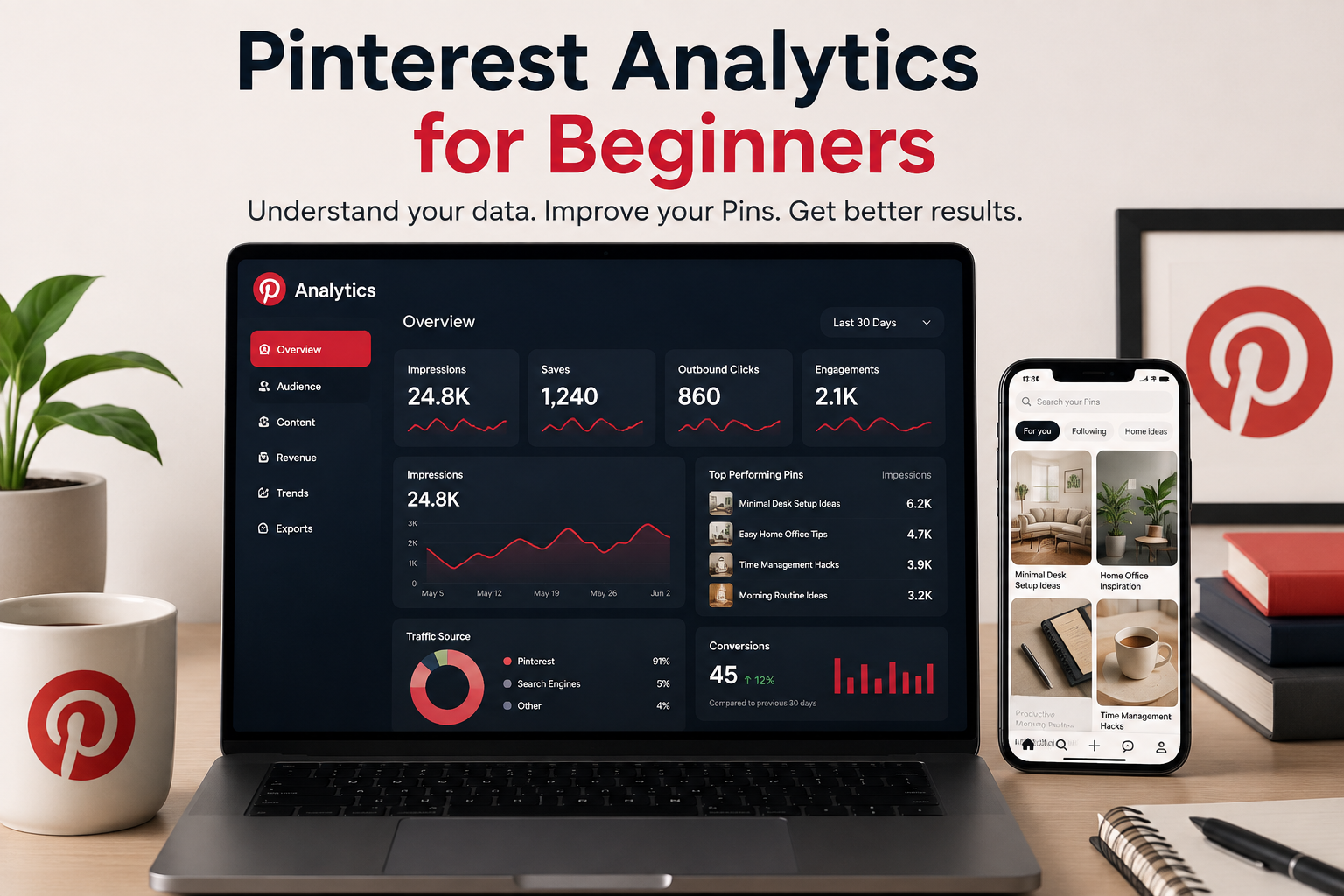
A visual overview of Pinterest performance metrics, traffic, and content results.
Understand Your Pinterest Audience Analytics
Pinterest Audience Analytics helps you understand who interacts with your content. By analyzing demographics, interests, locations, and devices, you can create Pins that match the people you want to reach.
Audience Demographics
Understand basic information about your Pinterest audience, including age groups, gender, and user characteristics. This data helps you create content that matches your audience profile.
Audience Interests
Pinterest shows the topics and categories your audience interacts with most. Use these insights to discover new content ideas and create more relevant Pins.
Audience Location
Location data helps you understand where your audience is searching from. This is useful for businesses targeting specific countries, regions, or local customers.
Device Performance
Understanding which devices people use to view your Pins helps you optimize your visual design and landing pages for a better user experience.
Use Audience Data To Create Better Pins
The goal of audience analytics is not just collecting information. Use these insights to improve your topics, visuals, keywords, and content direction.
Best Pinterest Analytics Tools To Track Your Growth
Pinterest Analytics provides valuable performance data, but combining it with other analytics tools can give you a deeper understanding of traffic, audience behavior, and business results.
Pinterest Native Analytics
Pinterest’s built-in analytics dashboard is the starting point for every creator and business. It helps you track impressions, saves, clicks, audience insights, and content performance directly from Pinterest.
✓ Pin performance tracking
✓ Audience insights
✓ Pinterest search data
Google Analytics 4
Google Analytics helps you understand what happens after visitors leave Pinterest. You can measure page visits, user behavior, engagement, and conversions from Pinterest traffic.
✓ Website traffic
✓ User behavior
✓ Conversion tracking
Hootsuite Analytics
Hootsuite helps marketers manage multiple social platforms and analyze content performance from one dashboard. It can simplify reporting and content management workflows.
✓ Social media reporting
✓ Scheduling workflow
✓ Team management
Tailwind Analytics
Tailwind is a Pinterest-focused scheduling and planning tool that helps creators organize content, maintain consistency, and analyze Pin performance.
✓ Content planning
✓ Scheduling Pins
✓ Pinterest workflow
Which Tool Should Beginners Use First?
Start with Pinterest Analytics because it provides the core data about your Pins. As your strategy grows, combine it with Google Analytics to understand website traffic and conversions.
High Impressions Do Not Always Mean Better Results
A Pin can reach thousands of users and still generate limited value. Effective Pinterest analysis looks beyond visibility and focuses on actions such as clicks, website engagement, and conversions.
Impressions
High visibility but low user action.
Impressions
Lower reach but stronger audience response.
Measure Actions, Not Only Visibility
Use impressions to understand reach, but use clicks and conversions to evaluate whether your Pins support real business goals.
Pin Clicks vs Outbound Clicks: What’s The Difference?
Pinterest provides different click metrics, and understanding the difference between Pin clicks and outbound clicks helps you measure whether users are only viewing your content or actually visiting your website.
Pin Clicks
Pin clicks measure how many times users clicked on your Pin to view more details. The click can happen inside Pinterest and does not always mean the user visited your website.
✓ Curiosity about your Pin
✓ Interest in your visual content
✓ Engagement with your design
Outbound Clicks
Outbound clicks measure how many times users clicked the link connected to your Pin and left Pinterest to visit your website, blog, product page, or landing page.
✓ Website traffic potential
✓ Strong search intent
✓ Content conversion opportunity
How Pinterest Click Journey Works
Which Metric Should You Focus On?
The right metric depends on your goal. If you want more awareness, Pin clicks and engagement are useful. If your goal is website traffic, leads, or sales, outbound clicks are usually more important.
Use Outbound Clicks To Understand Traffic Potential
Outbound clicks show when Pinterest users leave the platform and visit your website, product page, blog, or other destination. This metric helps you understand whether your Pins encourage meaningful action.
Pinterest Discovery
Users find your Pin through search, recommendations, or boards.
Outbound Click
A user chooses to continue beyond Pinterest.
Website Visit
The visitor reaches your chosen destination page.
Business Action
The visitor may read, subscribe, purchase, or contact you.
Why Clicks Matter
Review your headline, visual, or CTA.
Your content may have stronger audience relevance.
Pinterest Engagement Rate Explained: Measure Real Content Performance
Pinterest engagement rate helps you understand how actively users interact with your content. Instead of only looking at views, engagement shows whether people are saving, clicking, and responding to your Pins.
What Is Pinterest Engagement Rate?
Engagement rate measures how many interactions your Pins receive compared with how many times they are shown. It helps you understand whether your content is valuable to your audience.
Total Engagements ÷ Impressions × 100
What Counts As Engagement?
Pinterest engagement includes different actions users take after discovering your content. These signals help Pinterest understand content quality and relevance.
- Pin clicks
- Saves
- Outbound clicks
- Close-ups and interactions
Example: Understanding Engagement Quality
10,000 impressions
50 interactions
High reach, low engagement3,000 impressions
300 interactions
Lower reach, stronger audience responseWhy Engagement Rate Matters
A Pin with fewer impressions but stronger engagement can be more valuable than a Pin with high visibility and little action. Use engagement data to understand what topics, designs, and messages connect with your audience.
Pinterest Analytics Monthly Reporting Template
A monthly Pinterest analytics report helps you understand what improved, what needs testing, and which content deserves more attention. Instead of checking random numbers, review your performance using a simple repeatable process.
Review Overall Growth
Start your monthly review by checking your overall Pinterest account performance. Compare current results with the previous month to identify growth patterns.
✓ Impressions
✓ Total audience
✓ Engagement
✓ Followers
Find Top Performing Pins
Identify which Pins generated the strongest results. These successful examples can help you understand what topics, designs, and keywords your audience prefers.
✓ Highest clicks
✓ Most saves
✓ Best engagement
Compare Traffic Results
Review how Pinterest visitors behave after clicking your Pins. Website analytics can show whether your traffic is creating meaningful actions.
✓ Website visits
✓ Engagement
✓ Conversions
Plan Next Month Content
Use your findings to create better content decisions. Focus on topics and Pin formats that already show positive signals.
✓ New Pin ideas
✓ Keyword groups
✓ Content schedule
Simple Pinterest Monthly Report Checklist
Measure → Learn → Improve
The purpose of reporting is not only collecting data. Use Pinterest analytics insights to make better decisions, improve your Pins, and build a stronger content strategy over time.
Compare Pinterest Data With Website Analytics
Pinterest shows how users interact with your Pins, but your website analytics show what happens after the click. Together, both data sources create a clearer picture of content performance. Pinterest Analytics for Beginners becomes more useful when you compare Pinterest activity with what happens on your website after the click.
Different Tools Measure Different Results
Pinterest Analytics helps measure discovery and interaction. Website analytics help measure actions after visitors arrive, such as signups, purchases, or leads.
Track Conversions And Revenue In The Right System
Pinterest Analytics helps you understand discovery and clicks, but the final business result is usually recorded somewhere else. Track conversions where the actual action happens, such as your store, CRM, or affiliate platform.
Pinterest Exposure
Users discover your Pins through search, recommendations, or saved content.
Website Visit
Visitors click your Pin and arrive at your destination page.
Business Action
A user completes a goal such as signup, purchase, or inquiry.
Click → Commission
Affiliate platforms record earnings after users complete qualifying actions.
Visit → Purchase
Store analytics record products viewed, orders, and revenue.
Visit → Lead
Forms, calls, or CRM systems track customer inquiries.
Pinterest Analytics Best Practices To Improve Your Results
Using Pinterest Analytics correctly is not only about checking numbers. The real value comes from turning data into better content decisions. Follow these practices to understand your audience and improve your Pinterest strategy.
Review Data Regularly
Check your Pinterest performance consistently instead of waiting until results drop. Regular reviews help you identify growth patterns and content opportunities.
Compare Performance Over Time
A single day or one Pin does not show the complete picture. Compare weekly and monthly data to understand real progress.
Analyze Winning Content
Study your best-performing Pins to discover successful topics, visuals, keywords, and formats that your audience prefers.
Test Different Pin Designs
Create different versions of Pins and analyze which designs generate more clicks, saves, and engagement.
Connect Analytics With Goals
Choose metrics based on your objective. Traffic-focused accounts should prioritize clicks, while businesses should monitor conversions.
Create Data-Based Content
Use analytics insights to plan future content instead of creating Pins based only on assumptions.
The Simple Analytics Improvement Cycle
Create A Simple Pinterest Analytics Reporting Routine
A reporting routine helps you identify patterns instead of reacting to one Pin or one day of results. Review important metrics regularly and use your findings to plan better content.
Review Top Performing Pins
Identify Pins generating strong impressions, saves, and outbound clicks.
Find Content Patterns
Look for repeated topics, formats, or creative styles that perform well.
Compare Results Over Time
Review changes in clicks, engagement, and website performance.
Plan Your Next Content Batch
Use insights to create new Pins based on proven audience interests.
Use Analytics Data To Improve Your Next Batch Of Pins
Analytics becomes useful when it changes what you create next. Instead of guessing, use performance patterns to improve topics, visuals, headlines, and destinations.
People Like The Topic
Users are showing interest by saving your content.
Create More Related Content
Expand the topic with new angles, formats, or deeper guides.
Strong User Intent
People are interested enough to visit your destination.
Improve Similar Pins
Create more Pins with the same message, audience, and structure.
Good Visibility
Pinterest is showing your content to more users.
Improve The Next Step
Review headlines and CTAs if visibility is not creating clicks.
Pinterest Analytics Questions Answered
Learn the most common Pinterest Analytics questions beginners ask about metrics, tracking, reporting, and improving content performance.
What is Pinterest Analytics?
Pinterest Analytics is a reporting tool that helps creators and businesses understand how their Pins perform. It provides data about impressions, saves, clicks, audience, and conversions.
How do I access Pinterest Analytics?
Pinterest Analytics can be accessed through a Pinterest Business account. After setting up your account, you can view performance data from the Analytics dashboard.
What are Pinterest impressions?
Pinterest impressions show how many times your Pins appeared on users’ screens. A single person can create multiple impressions by seeing the same Pin more than once.
What is the difference between Pin clicks and outbound clicks?
Pin clicks measure interactions with your Pin inside Pinterest, while outbound clicks measure users who leave Pinterest and visit your website or destination page.
Are saves important on Pinterest?
Yes. Saves show that users found your content valuable enough to keep for later. Strong saves can indicate that your topic connects with your audience.
How often should I check Pinterest Analytics?
A weekly review helps you monitor performance, while a monthly review helps you identify larger trends and improve your content strategy.
Can Pinterest Analytics track website sales?
Pinterest Analytics helps measure traffic and actions, but sales tracking usually requires conversion tracking tools and website analytics.
Which Pinterest Analytics metrics should beginners focus on?
Beginners should focus on impressions, saves, outbound clicks, engagement, and conversions because these metrics show visibility, interest, traffic, and business results.
Do I need a Pinterest Business account for analytics?
Yes. Pinterest Analytics features are designed for Business accounts and provide access to performance insights and reporting tools.
Can Pinterest Analytics improve my marketing strategy?
Yes. Analytics helps you identify successful topics, designs, and content patterns so you can create better Pins based on real audience behavior.
Common Pinterest Analytics Mistakes
Analytics only becomes useful when data is interpreted correctly. Avoid these common mistakes to make better decisions from your Pinterest performance.
Only Tracking Impressions
High visibility does not always mean your content is creating meaningful results.
Compare Reach With Actions
Review clicks, engagement, and conversions along with impressions.
Ignoring Website Data
Pinterest metrics stop at the click. They do not show what happens after users leave the platform.
Connect Website Analytics
Use analytics tools to understand visitors, actions, and business outcomes.
Changing Everything At Once
Testing too many elements together makes it difficult to understand what worked.
Test One Major Change
Compare different ideas while keeping your analysis clear.
Reacting To One Pin
One result does not always represent a long-term pattern.
Look For Trends Over Time
Use multiple Pins and longer periods to guide decisions.